

Small blogs often feel stuck between wanting faster traffic and having limited time to tinker with technical SEO. The good news, you can get meaningful ranking and engagement gains without a huge content budget. One of the highest-impact, lowest-effort moves is a deliberate internal linking plan that guides both readers and search engines to your best pages.
In the next sections I walk you through a practical, step-by-step internal linking playbook for small sites, including quick wins you can implement in a single afternoon. I will bold one core phrase early to keep us focused, internal linking strategy for small blogs, and show how to use topic clusters, anchor text, and content refreshes to move the needle.
Why this matters for small sites
Internal links do three things well for small blogs. They help search engines discover and index pages, they concentrate link equity toward pages you want to rank, and they improve on-site user journeys so visitors stay longer and convert. Google’s documentation also encourages clear, contextual internal links and says every page you care about should be linked from another page on your site.
This is low-hanging fruit because you control these links, no outreach required. A few smart edits to old posts often delivers faster results than writing new content from scratch.
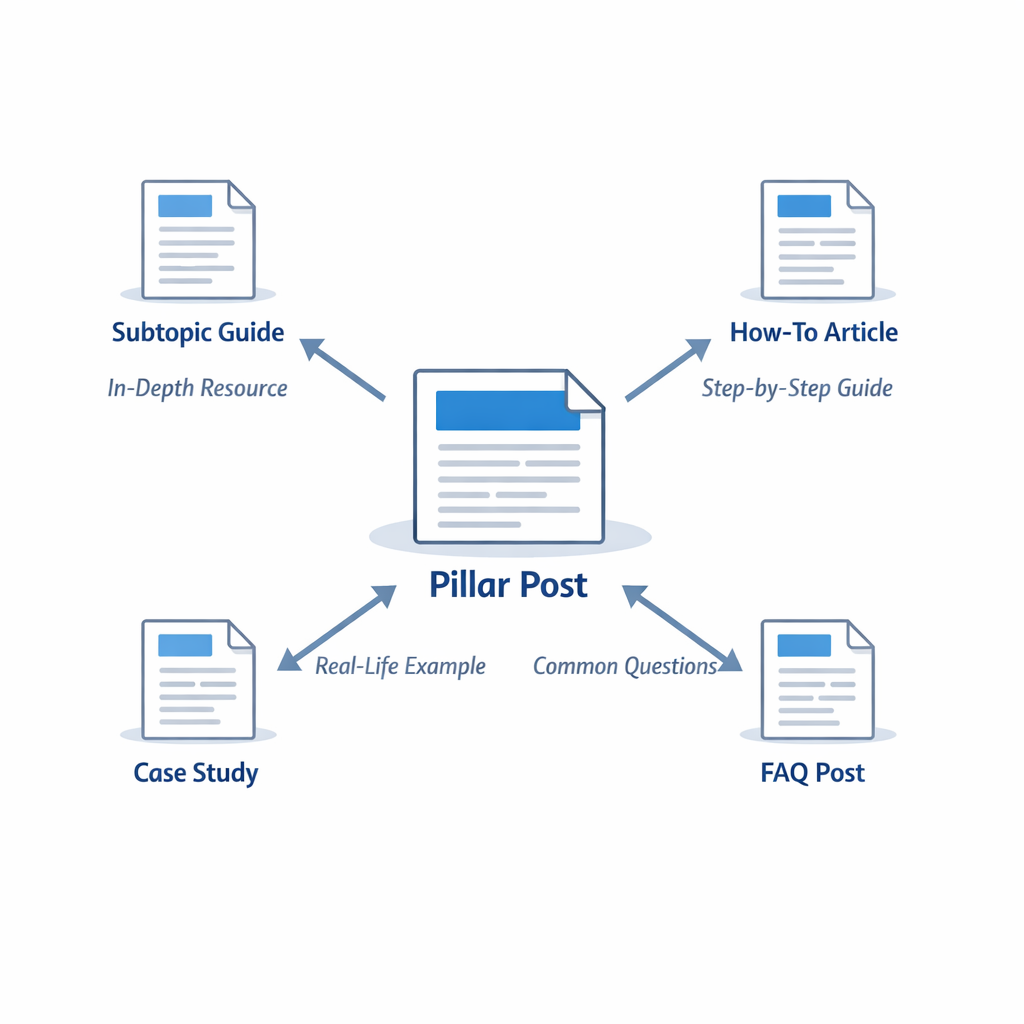
Core principles to follow
1. Map your content into a simple cluster
- Pick 3 to 5 pillar topics that match your business goals. Each pillar should have 3 to 8 supporting posts. This creates natural internal link opportunities.
- Use clear, user-focused pillar titles and short, descriptive URLs, so link text makes sense to readers.
2. Link from newer work back to pillar pages
- When you publish new articles, add 1 to 3 contextual links to the most relevant pillar posts. This pushes fresh signals and traffic to pages you want to rank.
3. Use descriptive, concise anchor text
- Write anchors that describe the destination, instead of vague phrases. This helps users and improves relevance signals.
- Avoid repeating identical anchor text across many pages, vary phrasing naturally.
4. Keep links helpful, not spammy
- Aim for a few high-quality internal links per article, not dozens. As a rule of thumb, 3 to 10 links per long post is reasonable. If a page already has heavy navigation links, focus body content links on the highest-value targets.
5. Surface deep pages that deserve traffic
- Don’t only link to category pages or the homepage. If a deep guide converts well or answers specific queries, link to it from related posts so it can be discovered and ranked.
Quick-win tasks you can do in an afternoon
- Run a quick inventory, list your top 30 posts by traffic or conversions.
- Pick 5 pillar pages you want to boost.
- Search your content for relevant phrases and add contextual links from 10 to 20 posts to those pillars.
- Update anchor text to be descriptive.
- Add an inline link near the top of longer posts to improve visibility and click-through.
These quick edits are often the fastest way to move organic sessions in 4 to 12 weeks.
Practical tactics and examples
Use contextual phrasing
Instead of linking "click here," write "how to optimize blog architecture," and link that phrase to your pillar on site structure. That gives context to users and search engines.
Add a ‘Related posts’ box with purpose
If you include a related-posts section, keep it editorial and relevant, not automated sprawl. Curate 3 to 5 posts that genuinely help the reader continue their journey.
Refresh old posts with new internal links
Look for evergreen posts that still receive traffic, then add links to new cluster pages. This recycles existing link equity and improves indexing for new pages.
Track changes and watch results
Use Google Analytics and Search Console to watch impressions and clicks. After you implement internal links, monitor the target page for increased impressions and rankings over the following weeks.
Common mistakes to avoid
- Over-linking every sentence, which looks spammy.
- Using generic anchors like "this post" or "learn more."
- Relying solely on site-wide navigation to pass authority. Content in the body matters more.
How to prioritize pages for internal link investment
- High conversion or revenue pages
- Pages with strong click-through but low average rank
- New pages you want to index and rank
Prioritize adding links from pages that already get consistent traffic, because those links carry the most referral visitors and value.
Tools and lightweight audits
You don’t need expensive software to get started. Use a site search operator in Google to find candidates quickly, or run a free crawl with a simple site crawler to list orphan pages and pages with few internal links.
For a small blog, a manual spreadsheet with URL, title, existing internal links, and target pillar is enough to organize a single afternoon of work.
Internal linking and AI-driven content
If you use automation or AI tools for content, ensure generated posts include thoughtful internal links and avoid repetitive, robotic anchor patterns. Internal links are most effective when they feel natural to a human reader.
Where to learn more
Google’s Search Central covers link and sitelink best practices and emphasizes descriptive anchor text and logical site structure. For further reading, check Google’s guidance on internal links and sitelinks.
Frequently Asked Questions
What is the single fastest internal linking win for a small blog?
Add contextual links from 10 popular, already-indexed posts to one pillar page you want to rank. Pick anchors that match user intent, and you’ll likely see indexation and traction faster than publishing new posts.
How many internal links should I add per article?
There is no strict number, but aim for natural relevance. For most posts, 3 to 10 internal links in the body is a reasonable range. Keep links useful and avoid stuffing.
Will internal linking replace backlinks?
No. Internal linking helps distribute authority within your site and improves discovery, but external backlinks remain important for competitive ranking signals.
Should I use site-wide links for SEO, like footer links?
Site-wide links are fine for utility pages, but priority links should be contextual in content. Body links carry stronger relevance cues for search engines.
Can internal links hurt my SEO?
Only if they are spammy, excessive, or use manipulative anchor text across many pages. Focus on quality and user benefit, and you’ll be safe.
How long until I see organic traffic changes from internal linking?
Expect to see some indexation improvements in days to weeks, and ranking or traffic changes typically in 4 to 12 weeks, depending on how often Google crawls your site.
Are automated internal linking tools safe to use?
They can help for scale, but review outputs carefully. Automated tools sometimes over-link or use repetitive anchors, which can reduce effectiveness.
Start improving internal links today
If you want an automated option that builds internal links as part of regular content publishing, check out the ContentBeast approach. They automate article creation and include optimized internal links and outbound links as part of the workflow, which can save time for small teams. Visit the ContentBeast homepage to explore features, or compare plans on the ContentBeast pricing page. You can also review available platform integrations on the ContentBeast integrations page.
Conclusion
A focused internal linking strategy for small blogs is one of the most efficient ways to improve visibility and reader experience. Start by mapping pillar topics, updating high-traffic posts with contextual links, and measuring results. With a few hours of targeted work, you can unlock better indexing, clearer site structure, and improved rankings without writing dozens of new articles. Keep links natural, helpful, and reader-first, and you will see consistent improvements over time.