

If you want faster SEO gains without publishing a ton of new content, focusing on the links inside your site is one of the highest-return moves you can make. Small edits, smart anchor text, and targeted link flow can deliver measurable traffic and ranking improvements in days or weeks, not months.
Here's the straight truth: a few minutes of focused internal linking can help search engines discover your pages, concentrate authority where it matters, and give users a smoother path to conversion. In this post you’ll get a compact, tactical plan of action — real quick wins you can implement today.
Why internal links are the low-hanging fruit
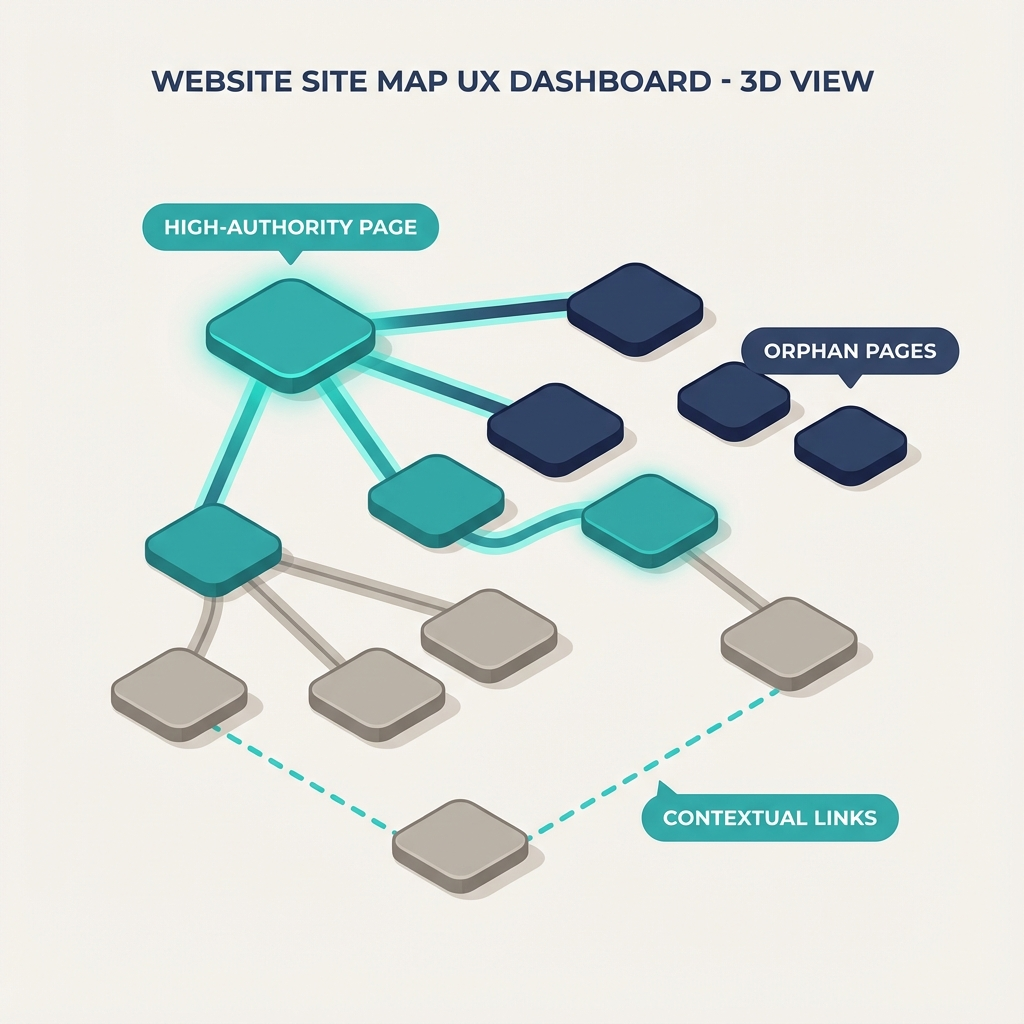
Internal links help search engines find and prioritize pages, and they help users move toward the next step. When you fix internal linking, you improve crawlability, pass link equity from strong pages to weaker ones, and reduce orphan pages that never get traffic. Google explicitly recommends linking between relevant pages and ensuring every page you care about has at least one internal link.
Quick takeaway, no fluff: you don’t need new backlinks or a major content campaign to lift a page. You need better link distribution, cleaner anchor text, and a few prioritized edits.
Internal Linking Quick Wins: 8 Fast Actions (do these in order)
1) Find your top authority pages and use them
Identify 5 to 10 pages that already attract external backlinks, social shares, or organic traffic. Those pages are your internal linking powerhouses. Add contextual links from those pages to target pages you want to boost. This passes authority efficiently and feels natural to readers.
Action: Use your analytics or search console to spot pages with the most external links and traffic, then add 1–3 contextual links from each to priority pages.
2) Fix orphan pages now
Orphan pages are pages with no internal links pointing to them. They rarely get crawled. Run a quick site crawl or do a Google site: search for a target URL to confirm. Add contextual links from related articles or include the page in a relevant category listing.
Action: Spend 20–40 minutes adding contextually relevant links to any orphan pages.
3) Use descriptive anchor text, not "click here"
Anchor text tells crawlers and users what a linked page is about. Swap vague anchors for short, descriptive phrases that match the page topic. Keep it natural — avoid keyword stuffing.
Action: Scan high-traffic posts and replace weak anchors with descriptive anchors that match the target page intent.
4) Prioritize deep pages with thin links
If product pages, feature pages, or long-form guides sit 3+ clicks from the homepage and have few internal links, prioritize them. Add links from category pages, pillar posts, and FAQ sections to reduce click depth.
Action: Find important pages that are more than two clicks from the homepage and add 2–4 quality links to them.
5) Repurpose older posts as link sources
Look at older but still-relevant content and add a short mention plus a link to your priority pages. This is faster than writing new posts and often highly effective.
Action: Pick 10 older posts and add one link to a priority page in each.
6) Use navigational and contextual mix
Sitewide navigation links are helpful, but contextual in-content links carry stronger relevance signals. Use both: add your highest-value pages to menus or sidebars sparingly, then drive the majority of link equity through contextual links within article bodies.
Action: Add a single, strategic navigation link to your site header or footer, then rely on contextual links for topical relevance.
7) Remove nofollow from internal links unless intentional
Nofollow internal links prevent equity flow. Most internal links should be dofollow. Audit for accidental nofollow attributes and remove them if there’s no technical reason to keep them.
Action: Run a simple crawler and remove nofollow on internal links that shouldn't be nofollow.
8) Track results and iterate weekly
Measure impressions, clicks, average position, and organic sessions for the pages you updated. Expect initial improvements in crawl frequency and impressions within days, and rank/traffic gains within 2–8 weeks depending on competition.
Action: Create a simple spreadsheet to track baseline and weekly changes.
Quick templates you can paste right now
- From a pillar post: "For a step-by-step checklist, see our guide to [Page Title]."
- From a product post: "Learn how this feature works in our [How-to Guide]."
- In an FAQ: "Yes — check our article on [Topic Page] for detailed steps."
These short contextual phrases are natural, convert well, and give good anchor context.
Tools and checks (fast)
- Run a site crawl to find orphan pages and broken links. Tools: Screaming Frog, Sitebulb, or your preferred site audit tool.
- Use Search Console or your analytics to identify pages with impressions but low clicks — these are prime candidates for internal linking. Google advises linking between relevant pages to help crawlers and users understand your site structure.
- Use an internal links report in Ahrefs or Semrush to find pages with few incoming internal links and target them.
Helpful reads: Google Search Central on links and crawlability, Ahrefs guide to internal links, Semrush internal links strategies.
How to avoid common objections
- "Won't this feel spammy?" Keep links contextual and useful. If a link helps the reader, it’s not spam. One or two natural links per 500–1,200 words is fine.
- "Do I need to change site menus?" Not usually. Only add persistent menu links for your highest-value pages. Focus most effort on contextual in-article links.
- "Will this break anything?" Make changes gradually and test clicks and conversions. Keep a rollback plan in case a change impacts UX.
Small teams, big wins: a weekly 60-minute routine
- 10 minutes: Identify 3 priority pages to boost. 2) 20 minutes: Add contextual links from 5 relevant existing posts. 3) 10 minutes: Fix anchor text and remove accidental nofollow attributes. 4) 10 minutes: Check site crawl for orphans and broken links. 5) 10 minutes: Log metrics.
Do this every week and you’ll compound gains with minimal effort.
Frequently asked questions
How soon will internal linking changes affect rankings and traffic?
Expect crawl and index updates within days, and rank improvements often within 2–8 weeks depending on how competitive the keywords are and how much authority you can re-distribute.
Can internal linking replace backlinks?
No. Internal linking helps distribute existing authority and speeds discovery, but external backlinks remain a major ranking factor. Internal linking amplifies the value of backlinks you already have.
How many internal links should one page have?
There’s no fixed number. If a page feels overloaded with links, remove low-value links. Focus on relevance, anchor text clarity, and user experience rather than hitting a target count.
Should I add internal links sitewide (footer/header)?
Use sitewide links sparingly for your most important pages. Contextual links inside relevant content generally pass stronger signals and offer better engagement.
What anchor text should I avoid?
Avoid generic anchors like "click here" and keyword-stuffed anchors that read unnaturally. Use concise, descriptive phrases matching the target page’s topic.
How do I find internal link opportunities quickly?
Search your site in Google with site:yourdomain.com and a topic keyword to find pages that are relevant but don’t yet link to your target. Tools like Ahrefs and Semrush also provide internal linking opportunity reports.
Are there any technical flags I should watch for?
Yes. Watch for nofollow attributes on internal links, excessive redirect chains, and pages blocked by robots.txt or with noindex tags that you expect to be crawled.
Ready to scale your blog with less work?
If you want to automate these tasks, get daily content that includes optimized internal links, or free up time for strategy, check how ContentBeast automates blog writing and internal linking across your site at https://contentbeast.com/. For pricing and plan details to scale quickly, see https://contentbeast.com/pricing/.
Conclusion
You don’t need a huge content budget or new backlinks to get meaningful traffic lifts. Focused internal linking is a high-impact, low-effort strategy that speeds discovery, concentrates authority, and improves user experience. Pick a set of priority pages, spend an hour implementing the quick wins above, and measure weekly. Over time, these small investments compound and deliver steady organic growth.